FXAA vs TAA: Which Anti-Aliasing Method Is Better for Gaming?
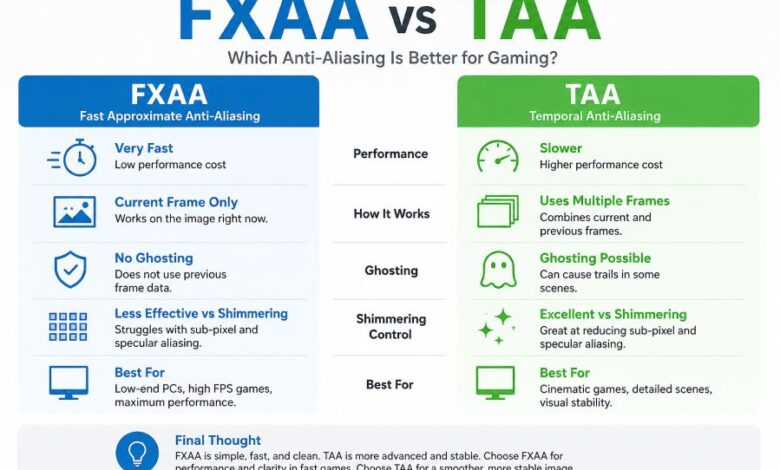
FXAA favors speed and clean motion, while TAA fights shimmering with information from previous frames. Here’s where each method wins, where it struggles, and which one makes more sense for your PC.

Introduction
Anti-aliasing sounds simple until you switch it off.
Suddenly, diagonal lines turn into stair steps. Distant fences flicker. Grass sparkles while you move. Metallic surfaces crawl with tiny bright pixels that refuse to stay still.
Two settings frequently offered as a fix are FXAA and TAA.
They may sit beside each other in a graphics menu, but they work in very different ways.
FXAA examines the image you have right now and smooths detected edges. TAA goes further. It combines information collected across several frames, giving it a much better chance of controlling shimmer and tiny sub-pixel details.
That extra information comes with baggage.
TAA can look soft. Fast movement may produce trails. A poor implementation can make an otherwise sharp game look smeared.
FXAA avoids those temporal problems, yet it cannot fix everything TAA can.
So the real FXAA vs TAA debate is not simply image quality against performance. It is a choice between two different ways of handling aliasing.
Quick Facts: FXAA vs TAA
| Feature | FXAA | TAA |
|---|---|---|
| Full name | Fast Approximate Anti-Aliasing | Temporal Anti-Aliasing |
| Main method | Screen-space filtering | Multi-frame sampling |
| Uses previous frames | No | Yes |
| Performance cost | Very low | Low to moderate |
| Ghosting risk | Very low | Possible |
| Shimmering control | Limited | Strong |
| Motion clarity | Usually cleaner | Can become softer |
| Fine sub-pixel detail | Limited | Better |
| Specular aliasing | Limited | Stronger |
| Low-end GPU suitability | Excellent | Depends on implementation |
| Best use | Maximum FPS, simple AA | Stable image, detailed 3D scenes |
Epic describes FXAA as a spatial-only post-processing method that detects high-contrast edges and blends nearby pixels. Its temporal methods instead sample different positions across frames and reuse earlier frame information.
What Is Anti-Aliasing?
A screen is made from a fixed grid of pixels.
A 3D scene is not.
That mismatch creates aliasing.
Take a diagonal railing. In the game world, the line can be perfectly straight. Once converted into square screen pixels, its edge may appear as a series of visible steps.
That is the familiar form of aliasing.
Modern games have harder problems too.
You might see:
- shimmering grass in the distance
- flashing fence wires
- sparkling reflections
- unstable hair strands
- crawling texture detail
- jagged object silhouettes
- tiny geometry appearing and disappearing during movement
Anti-aliasing tries to make those problems less visible.
The difficulty is that no AA method gets every benefit for free.
What Is FXAA?
FXAA stands for Fast Approximate Anti-Aliasing.
It is a post-processing method.
The 3D scene is rendered first. FXAA then examines the finished frame, searches for areas that resemble jagged edges, and smooths them.
Think of it as a smart filter applied after most of the hard rendering work is complete.
Epic describes FXAA as a spatial-only technique that uses high contrast to locate edges before blending around them. Unity describes it as a full-screen per-pixel pass and identifies it as its least resource-intensive AA option in URP.
That explains its popularity.
It is cheap.
Very cheap.
How FXAA Works
FXAA does not need to render the scene several times.
It does not need a collection of earlier frames.
Instead, it looks for strong differences in brightness and color between neighboring pixels.
A simplified version of the process looks like this:
- The game renders a normal frame.
- FXAA checks neighboring pixels for strong contrast.
- It estimates where an aliased edge exists.
- Pixels around that edge are blended.
- The smoother frame is displayed.
The technique is approximate by design.
It does not know the exact geometry that originally created an edge. It works from the image already produced.
That keeps the GPU workload small.
It creates limitations too.
FXAA Advantages
FXAA Has a Very Small Performance Cost
Performance is FXAA’s strongest argument.
Unity calls FXAA the least resource-intensive AA option in its Universal Render Pipeline. Godot similarly describes it as faster than its other available anti-aliasing techniques.
That makes FXAA attractive for:
- budget gaming PCs
- integrated graphics
- older GPUs
- laptops
- mobile hardware
- high-refresh gaming
- games already close to their GPU limit
If switching to heavier anti-aliasing drops your frame rate below a comfortable level, FXAA makes sense.
FXAA Does Not Create Traditional TAA Ghosting
FXAA only works with the current frame.
There is no old frame waiting in memory to be blended with the new one.
That matters during fast movement.
A moving character will not develop a temporal trail because FXAA has no temporal history from which such a trail could appear.
The picture can still blur from FXAA’s filtering, but that is a different artifact.
FXAA Is Simple
FXAA does not rely on accurate motion vectors for every animated object.
It does not need to work out whether a pixel from the previous frame still belongs to the same surface.
That makes it far easier to fit into many rendering pipelines.
FXAA Can Work Well on Low-End Hardware
Godot specifically notes that FXAA remains useful as an option for users with low-end GPUs and continues to appear in mobile games.
For someone trying to keep a game playable on limited hardware, that practical benefit may matter more than perfect edge stability.
FXAA Disadvantages
FXAA is fast because it has less information.
That limitation becomes obvious once the camera starts moving.
FXAA Cannot Properly Fix Temporal Aliasing
Imagine a very thin cable in the distance.
During one frame, it lands directly on screen pixels and looks visible.
Move the camera by a tiny amount and the cable falls between pixel samples.
Now part of it disappears.
A few milliseconds later it returns.
You see shimmer.
FXAA cannot look back and say, “That cable existed in the last frame.”
It only sees the current picture.
Older Unreal Engine documentation describes the problem directly: FXAA can solve many visible aliasing artifacts but cannot fully prevent temporal aliasing.
FXAA Struggles With Specular Shimmering
Bright reflections can become extremely small.
A tiny highlight might cover less than one pixel and rapidly jump across the screen as either the camera or object moves.
This creates sparkling noise.
Godot notes that FXAA’s lack of temporal information limits how much it can do against specular aliasing.
Modern games with detailed materials can expose this weakness quickly.
FXAA Can Make Fine Detail Soft
FXAA sees contrast and tries to smooth likely edges.
Sometimes the detected contrast belongs to useful texture detail rather than unwanted aliasing.
Small text, leaves, thin patterns and distant textures may lose some crispness.
So although FXAA is often described as the “sharp” alternative to TAA, it can blur an image too.
Godot notes an interesting distinction: FXAA may introduce more blur than TAA in a stationary view, while TAA can become softer during camera movement.
What Is TAA?
TAA stands for Temporal Anti-Aliasing.
The word temporal is the important part.
TAA does not treat each frame as an isolated image. It uses data from previous frames to improve the current one.
Academic research describes TAA as temporally amortized supersampling. A major 2020 survey identified sample accumulation and history validation as two central parts of the technique.
That sounds technical.
The idea is easier.
Instead of trying to gather every useful sample in a single frame, TAA gathers different samples over time and combines them.
How TAA Works
A simplified TAA pipeline looks like this.
1. The Sample Position Moves Slightly
The game shifts its sampling pattern by a tiny fraction of a pixel each frame.
These movements are commonly called jitter.
Frame one samples one position.
Frame two samples a slightly different position.
Frame three shifts again.
Tiny details that were missed in one frame may become visible in another.
2. Previous Frame Information Is Stored
TAA keeps a history.
That historical image contains information gathered before the current frame.
The renderer can reuse useful parts of it.
3. Motion Is Tracked
Objects rarely stay still.
The player moves. Enemies run. Trees sway. Cars pass.
TAA needs to know where pixels from previous frames belong now.
Modern implementations generally rely on motion or velocity information to reproject historical data into the current frame.
4. Bad History Must Be Rejected
This is one of the hardest parts.
Picture a character standing in front of a wall.
The character moves left.
A part of the wall that was hidden is now visible.
TAA cannot simply reuse the old pixel at that screen position because that old pixel belonged to the character, not the wall.
If outdated information survives, you get a trail.
That is ghosting.
TAA systems use various forms of history validation to decide which earlier samples can still be trusted. Research into TAA treats history validation as one of its main technical components.
TAA Advantages
TAA Is Much Better at Reducing Shimmering
This is the big one.
TAA knows what appeared in previous frames.
That gives it a way to stabilize objects and details that keep falling between pixel samples.
Thin railings become steadier.
Vegetation flickers less.
Distant geometry stops crawling as aggressively.
Unity states that TAA’s frame history produces smoother edges in motion with less flickering.
TAA Handles Sub-Pixel Detail Better
Some objects are thinner than a pixel.
A spatial filter cannot recover information that never appeared in its current frame.
TAA has another chance.
A jittered sample in the next frame may capture that detail. Temporal accumulation can then preserve useful information across time.
That is a major reason TAA works well with:
- grass
- fences
- cables
- hair
- distant objects
- fine geometry
TAA Is Strong Against Specular Aliasing
Modern materials can produce bright microscopic reflections.
These highlights tend to shimmer badly under movement.
TAA’s ability to stabilize information across several frames gives it a clear advantage here.
Godot says temporal anti-aliasing is far more effective than FXAA against specular aliasing.
TAA Fits Detailed Modern Rendering Better
Complex scenes contain far more than jagged polygon edges.
Textures, shaders, transparent surfaces and tiny geometric details can all create instability.
A spatial edge filter sees the final symptom.
Temporal rendering has access to more information.
This is one reason TAA became so widely adopted in real-time renderers. The 2020 Computer Graphics Forum survey described it as the most widely used anti-aliasing technique in real-time rendering at that time.
TAA Disadvantages
TAA’s history is both its greatest strength and its biggest headache.
TAA Can Cause Ghosting
Ghosting appears when stale information from previous frames remains visible.
You may notice:
- faint trails behind characters
- smears behind weapons
- residue around particles
- shadows that appear to lag
- trails behind moving foliage
Unity warns that TAA can create ghosting in extreme cases, such as a fast-moving object passing across a strongly contrasting background.
Good TAA implementations work hard to reject invalid history.
Bad ones make ghosting hard to ignore.
TAA Can Look Soft During Motion
This is probably the most common complaint players have about TAA.
Stand still and the image may look clean.
Start moving the camera and texture detail can appear softer.
Fine patterns may smear slightly.
Objects can lose the crisp appearance they had in a static screenshot.
That does not happen equally in every game.
Implementation matters a lot.
Bad Motion Data Can Hurt TAA
Temporal reconstruction depends on knowing how scene information has moved between frames.
Animated materials and effects make that job difficult.
Examples include:
- swaying plants
- cloth
- particles
- hair
- transparent effects
- procedural animation
If historical pixels are projected to the wrong place, the result can smear.
Disocclusion Is Hard
A newly visible surface has no valid recent history for its current screen position.
TAA must recognize that situation quickly.
Trust history too much and you get ghosting.
Reject too much history and the image can start shimmering again.
That balancing act explains why two games can both list “TAA” in their settings yet look completely different.
FXAA vs TAA Image Quality
For a modern 3D game, TAA usually produces the more stable image.
That does not automatically mean the sharper image.
FXAA can look immediate and clean, especially during quick camera movement. Yet shimmering may become much easier to see.
TAA suppresses that shimmer. The trade is a greater chance of motion softness or ghosting.
Here is the practical split:
| Image Issue | Better Choice |
|---|---|
| Jagged geometry edges | TAA |
| Shimmering during movement | TAA |
| Specular flicker | TAA |
| Thin distant geometry | TAA |
| Ghosting avoidance | FXAA |
| Clean fast motion | FXAA often feels better |
| Very low GPU cost | FXAA |
| Stable cinematic image | TAA |
FXAA vs TAA Performance
FXAA wins on raw performance.
There is little argument here.
It is a lightweight full-screen filtering pass.
TAA has more work to perform. It may need frame history, jitter, motion information, reprojection and validation before combining the result.
That does not mean TAA is automatically heavy.
Its cost varies by engine, quality setting, resolution and implementation.
Epic describes FXAA as fast and suitable for low-end devices, while Unity identifies it as its least resource-intensive AA technique in URP.
So if the question is purely:
Which gives more FPS, FXAA or TAA?
The safer answer is FXAA.
FXAA vs TAA at 1080p
1080p can expose the weaknesses of both techniques.
FXAA may soften edges and small textures because each screen pixel represents a relatively large piece of the image.
TAA faces a different problem. With fewer native pixels available, its reconstruction and filtering can make moving scenes look noticeably soft.
Still, 1080p is exactly where shimmering can become distracting.
For single-player games with dense vegetation or detailed reflections, TAA often gives the cleaner experience.
For fast competitive games, FXAA may feel sharper.
FXAA vs TAA at 1440p
1440p gives both methods more information to work with.
Raw aliasing is less obvious than at 1080p.
FXAA can look cleaner because less aggressive smoothing is visually needed.
TAA still holds the advantage in temporal stability, particularly with detailed foliage, reflective surfaces and distant geometry.
This resolution offers a good middle ground.
The quality of the game’s AA implementation starts to matter more than the label itself.
FXAA vs TAA at 4K
Native 4K reduces visible stair-stepping by packing far more pixels into the image.
Aliasing does not disappear.
Thin geometry can still shimmer.
Bright reflections can still flicker.
TAA remains useful for keeping those details stable.
FXAA becomes more attractive at 4K than it is at lower resolutions because much of the visible edge problem has already been reduced by pixel density.
A player who dislikes temporal softness may prefer FXAA at native 4K, provided the game does not suffer from heavy shimmering.
FXAA vs TAA for Competitive Gaming
Competitive players usually care about a different set of priorities.
They want:
- high frame rates
- clear enemy silhouettes
- clean camera movement
- low GPU load
- minimal visual trails
Those priorities can favor FXAA.
TAA may still look cleaner in a technical sense, yet its motion softness can make a fast shooter feel less crisp.
If the game’s FXAA implementation looks acceptable and saves GPU time, competitive players may prefer it.
Some may choose SMAA or no AA instead.
There is no universal esports setting.
FXAA vs TAA for Single-Player Games
TAA usually makes more sense here.
Large open worlds often contain:
- vegetation
- distant structures
- detailed lighting
- reflective materials
- cinematic camera movement
- fine geometry
These are exactly the cases where temporal stability becomes valuable.
A slight loss of sharpness may be less distracting than constant shimmering.
A good sharpening filter can recover part of the lost crispness too.
FXAA vs TAA for Low-End PCs
Pick FXAA first.
Its small GPU cost is hard to beat.
If TAA costs enough performance to push the game below your target frame rate, the cleaner temporal image is probably not worth it.
Frame rate matters too.
Low frame rates can make temporal artifacts easier to notice because more movement occurs between successive frames.
Does TAA Increase Input Lag?
TAA using previous-frame image information does not mean it automatically delays the game by one whole frame.
The renderer uses historical data to resolve the current image.
That is different from displaying an old frame instead of the current frame.
TAA can still affect latency indirectly if its GPU cost lowers your frame rate or increases render time.
FXAA’s lighter workload gives it an advantage in GPU-limited situations.
Why Does TAA Look Bad in Some Games?
Because “TAA” is not one fixed visual preset shared by every engine.
Developers choose how much history to keep.
They choose how aggressively to reject old samples.
They choose sharpening strength.
They choose motion-vector handling.
They choose how transparent effects respond.
The academic TAA survey identifies both sample accumulation and history validation as major parts of the method, with unresolved image-quality problems still forming an important area of research.
That is why saying “TAA is blurry” is incomplete.
Some implementations are.
Others are far cleaner.
Why Does FXAA Still Exist?
Because being simple has value.
FXAA is easy to run.
It works quickly.
It requires no temporal history.
It can give players with weaker GPUs a usable anti-aliasing option.
Godot notes that FXAA has largely lost favor on desktop compared with temporal methods, yet still considers it useful for low-end GPU users.
That is a pretty fair description of its place today.
It is older.
Not useless.
Can FXAA and TAA Be Used Together?
They can, but stacking them is not automatically an improvement.
TAA may already soften the picture.
Putting FXAA over the resolved frame can smooth remaining edges, yet it can remove more fine detail at the same time.
Most players should use whichever primary AA method the game’s renderer handles best rather than assuming two filters must beat one.
TAA vs Modern Temporal Upscaling
TAA helped establish ideas that became increasingly important in temporal reconstruction.
Modern engines now include techniques such as:
- TAAU
- TSR
- DLSS Super Resolution
- FSR temporal upscaling
- XeSS
These are not simply alternative names for traditional TAA.
They can use current and previous frame information to reconstruct a higher-resolution result.
Epic groups TAAU, TSR and third-party solutions such as DLSS, FSR and XeSS within its temporal-upscaling pipeline.
This matters because a modern game may not give you a traditional TAA vs FXAA choice at all.
A temporal upscaler can effectively take over much of the anti-aliasing job.
FXAA vs TAA: Which Should You Choose?
Choose FXAA if you care most about:
- maximum frame rate
- low GPU cost
- simple anti-aliasing
- cleaner fast movement
- avoiding temporal ghost trails
- running on weaker hardware
Choose TAA if you care most about:
- reduced shimmering
- stable foliage
- clean distant geometry
- less specular flickering
- better sub-pixel detail
- a steadier cinematic image
For most visually rich single-player games, TAA is the stronger starting point.
For an older PC or a competitive game where motion clarity matters more than shimmer, FXAA can be the smarter setting.
Final Thought
The easiest way to understand FXAA vs TAA is to stop thinking of them as two quality levels of the same filter.
They solve the problem differently.
FXAA looks at one finished frame and smooths what it finds. Fast. Simple. Cheap.
TAA remembers.
That memory lets it stabilize tiny details and control shimmer far better, yet old information can sometimes hang around longer than it should. That is where softness and ghosting enter the picture.
For modern graphics, TAA is usually more capable.
For raw speed and clean temporal behavior, FXAA still has a job.
The best setting is the one that fixes the artifacts you notice without creating new ones that bother you more.
Frequently Asked Questions
Is TAA better than FXAA?
TAA usually provides better image stability, especially for shimmering, thin geometry and bright specular details. FXAA is faster and avoids temporal ghosting.
Does FXAA increase FPS?
FXAA usually has a very small GPU cost compared with heavier anti-aliasing methods. Switching from TAA to FXAA can improve performance in some games, though the actual gain depends on the renderer and GPU load.
Why does TAA look blurry?
TAA combines current and historical image information. This temporal filtering can soften fine detail, particularly while the camera moves. Sharpening and better history rejection can reduce the effect.
Does FXAA cause blur?
Yes. FXAA smooths detected high-contrast edges in screen space, so some fine image detail can become softer.
Which is better for 1080p, FXAA or TAA?
TAA is usually better for reducing shimmer at 1080p. FXAA may feel sharper during movement and costs less GPU performance. The better option depends heavily on the game’s implementation.
Which is better for FPS games?
FXAA can suit competitive FPS games because of its low performance cost and lack of temporal ghosting. TAA may provide cleaner edges but can look softer during fast camera movement.
Does TAA reduce shimmering?
Yes. Reducing temporal shimmer is one of TAA’s major strengths because it can reuse information gathered from earlier frames.
Can TAA cause ghosting?
Yes. Ghosting can appear when outdated frame history is reused incorrectly, especially around fast-moving objects or disoccluded surfaces.
Is FXAA good for low-end PCs?
Yes. FXAA is one of the lightest common anti-aliasing techniques and is a sensible option for weaker GPUs.
Is TAA the same as DLSS or FSR?
No. DLSS, FSR temporal upscaling, TSR and similar systems are more advanced reconstruction methods. They share several temporal concepts with TAA, including frame history and motion information, but they are not simply standard TAA.