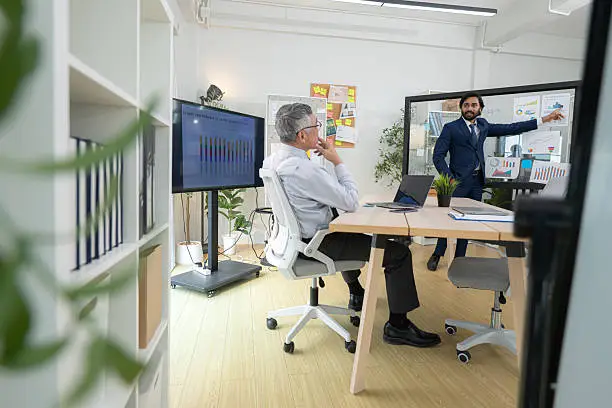
Hybrid working has become the norm rather than the exception. Employees now split their time between home offices and company workspaces, and businesses have had to rethink how their teams communicate. When half a meeting’s participants join from a laptop screen while the other half sit in a conference room, keeping everyone engaged becomes a genuine challenge.
Poor audio quality, laggy video, or awkward camera angles can quickly turn a productive meeting into a frustrating one. Remote employees miss visual cues, in-office staff struggle to hear dial-in voices clearly, and important details get lost in translation. This is where commercial audio visual systems step in, offering the technology needed to bridge the physical gap between remote and in-office employees.
Why Commercial Audio Visual Systems Matter
Quality audio and video aren’t just nice-to-haves anymore. They directly affect how engaged and included remote participants feel during meetings. When a colleague joining from home can clearly see facial expressions and hear every word without interruption, they’re far more likely to contribute meaningfully to the conversation.
On the flip side, a poorly configured AV setup can quietly sabotage collaboration. Choppy video calls, muffled audio, and constant “can you hear me?” moments waste time and drain energy. Over time, these small frustrations add up, leading to disengagement and lower productivity across hybrid teams.
Seamless connectivity is the backbone of any successful hybrid workplace. Teams need systems that just work, without requiring an IT degree to troubleshoot mid-meeting. That reliability is precisely what well-designed commercial audio visual systems deliver.
Key Components of Effective AV Solutions
Building an effective hybrid meeting space starts with the right hardware and infrastructure. A few essentials stand out:
- High-definition cameras and microphones: Clear video and crisp audio capture ensure that remote participants can see and hear everything happening in the room, from facial expressions to side conversations.
- Interactive displays and large screens: These improve visibility for shared documents, presentations, and video feeds, making it easier for everyone to follow along regardless of where they’re sitting.
- Reliable networking infrastructure: Hybrid meetings often involve multiple participants streaming simultaneously, so a strong network is non-negotiable for avoiding dropped calls and lag.
- Wireless connectivity options: Cable-free setups give employees the flexibility to walk in, connect their device, and start collaborating without delay.
Together, these components form the foundation of a workspace that supports genuine collaboration rather than just tolerating it.
How AV Solutions Improve Hybrid Work
When implemented thoughtfully, AV technology does more than fix technical glitches. It fundamentally changes how hybrid teams experience meetings.
Remote employees feel more present and included when they can clearly see and hear what’s happening in the room. This reduces the sense of being an outsider looking in, which is a common complaint among remote workers. Miscommunication caused by poor audio or video also drops significantly, meaning fewer follow-up emails to clarify what was actually said.
Presentations become noticeably more professional and engaging too. Sharing a screen that’s crisp and easy to read, paired with clear audio, keeps everyone’s attention where it belongs. And because commercial audio visual systems can be tailored to different room sizes and layouts, they support everything from small huddle rooms to large conference halls, giving businesses the flexibility to standardize their setup across the entire office.
Implementing Commercial Audio Visual in Your Office
Rolling out new AV technology doesn’t have to be overwhelming if approached methodically.
Start by assessing your current setup. Identify where meetings tend to break down, whether that’s poor audio in a specific room or a lack of screens for visual collaboration. This helps pinpoint exactly where investment is needed most.
Next, choose scalable solutions that can grow alongside your team. A system that only works for five-person meetings won’t serve you well if your company doubles in size next year. Look for equipment and platforms designed with flexibility in mind.
Proper installation and testing are just as important as the equipment itself. A rushed setup can lead to persistent technical issues that undermine the entire investment. Take the time to test every room under real meeting conditions before rolling it out company-wide.
Finally, don’t skip employee training. Even the best commercial audio visual system won’t help much if staff don’t know how to use it. A short training session can go a long way toward ensuring smooth adoption and fewer support tickets down the line.
Bringing It All Together
Hybrid work is here to stay, and the businesses that thrive in this setup are the ones investing in the right tools to support it. Effective AV solutions aren’t just about fixing technical problems. They’re about creating a workplace where every employee, whether remote or in-office, can contribute fully and feel genuinely connected to their team.
Investing in quality commercial audio visual systems pays off in smoother meetings, better collaboration, and stronger employee engagement. Businesses that take the time to assess their needs, choose scalable technology, and train their teams properly will find themselves well-equipped for the future of work. The upfront effort is small compared to the long-term value of a workplace where communication simply works.