Traveling with connected devices has become part of everyday life, but maintaining internet access while moving between destinations is not always straightforward. A traveler might use a smartphone for navigation, a laptop for remote work, and a tablet for reservations or entertainment, all while crossing different cities and countries. Understanding how do portable hotspots work helps explain why a dedicated connectivity device can be useful when several devices need internet access without relying on individual mobile data plans or public WiFi networks.
The basic idea is simple: a portable hotspot connects to a mobile network and converts that connection into a local WiFi signal. Other compatible devices can then connect to it in much the same way they connect to a home or office router. However, the quality of the experience depends on more than the hotspot itself. Cellular coverage, network congestion, data availability, device battery life, and the number of connected users can all influence performance.
International travel introduces another consideration because mobile networks and data arrangements vary between countries. A connection that works well in one destination may require a different plan or network in another. Travelers visiting several countries during a single trip therefore benefit from understanding how portable connectivity works before departure, rather than waiting until they arrive at an unfamiliar airport or train station to solve an internet problem.
Understanding What Happens Inside a Portable Hotspot
A portable hotspot performs two main functions. First, it establishes an internet connection through a supported cellular network, commonly using 4G LTE or 5G technology. Second, it shares that connection through WiFi so nearby devices can access online services. This allows a laptop, smartphone, tablet, or another compatible device to use one mobile internet connection without each device needing its own separate cellular plan.
The hotspot essentially creates a small wireless network that travels with its owner. After the device is switched on and connected to an available mobile network, the user connects other equipment using the hotspot’s WiFi name and password. The connected devices then send and receive data through the hotspot. Activities such as checking maps, opening websites, receiving emails, and joining online meetings all depend on this underlying process.
A dedicated hotspot also separates internet sharing from the user’s primary smartphone. When someone relies on phone tethering, the phone handles both its normal responsibilities and the task of distributing internet access. A separate hotspot can take over the connectivity role, leaving the phone available for calls, messaging, navigation, and other daily tasks. The advantage becomes more noticeable when several devices need to remain connected for extended periods.
Why Cellular Coverage Matters More Than the WiFi Signal Alone
A strong WiFi signal does not automatically guarantee a fast internet connection. The hotspot may communicate effectively with a nearby laptop while receiving a weak or congested cellular signal from the mobile network. This distinction is important because WiFi controls the local connection between devices, whereas cellular coverage determines how the hotspot reaches the wider internet.
For example, a traveler sitting inside a hotel room may see full WiFi signal strength on a laptop but still experience slow downloads because the hotspot has poor cellular reception indoors. Moving closer to a window or to another location with better mobile coverage may improve the connection. In a crowded city, performance may also change during busy periods when many people are using the same mobile network.
Travelers should therefore evaluate connectivity in two stages. The first is whether the hotspot supports the mobile network technology and frequency bands available at the destination. The second is whether the selected network provides usable coverage in the places where the device will actually be used. Checking these factors can prevent unrealistic expectations about performance in underground stations, remote countryside, thick-walled buildings, or other challenging environments.
Planning Internet Access Across Multiple European Countries
A multi-country European itinerary can involve several different network environments within a short period. Someone might begin in France, continue to Germany by train, spend a few days in Austria, and finish the trip in Italy. Although the journey may feel like one continuous holiday, mobile connectivity depends on the networks and data arrangements available in each destination.
This is where pocket wifi europe becomes a useful consideration when planning a trip. A portable WiFi device can provide a shared connection for travel companions and equipment, while certain services allow users to access supported mobile networks across multiple countries. The exact coverage and data terms vary by device and plan, so travelers should confirm that every intended destination is included before leaving home.
A route-based approach is more useful than choosing a device solely because its packaging mentions international coverage. Travelers should list the countries they will visit, identify whether they will need substantial data for work or mostly basic browsing, and estimate how many devices will connect at once. They should also consider whether they will spend time in smaller towns, rural accommodation, or locations away from major transport routes, where coverage may differ from that in large cities.
Choosing Between Phone Tethering and a Dedicated Device
Phone tethering is often sufficient for short tasks. A traveler who occasionally needs to check an email on a laptop or share a connection with a tablet may not need to purchase additional equipment. The smartphone is already available, setup is straightforward, and there is no separate hotspot to carry or charge.
A dedicated portable hotspot becomes more attractive when internet sharing is a regular part of the trip. Families may want several phones and tablets connected simultaneously, while remote workers may need a laptop online throughout the day. Keeping the connection on a separate device can also reduce the demand placed on the primary phone’s battery during long working sessions. However, a dedicated hotspot still requires charging and a suitable data plan, so it is important to compare the additional cost with the actual benefits.
The decision should reflect usage rather than assumptions that one method is always better. For a weekend city break with minimal internet needs, phone tethering may be enough. For a longer itinerary involving multiple countries, several travelers, and daily laptop use, a dedicated hotspot can offer a more organized way to share connectivity. The most suitable option is the one that matches the number of devices, expected data consumption, and travel schedule.
Managing Battery Life During Long Travel Days
Battery planning is easy to overlook when arranging international connectivity. Travelers may spend an entire day moving between railway stations, museums, restaurants, hotels, and tourist attractions without having a convenient opportunity to recharge. If a hotspot runs out of power midway through the day, connected devices lose access to its network even when mobile coverage remains available.
The practical solution is to compare advertised battery life with the way the device will actually be used. Continuous video calls, large file transfers, weak cellular reception, and multiple connected devices can increase power consumption. Manufacturer estimates should therefore be treated as guidance rather than a guarantee that every hotspot will last for the same number of hours under every condition.
Charging arrangements also deserve attention. A traveler carrying a phone, camera, laptop, and hotspot may benefit from planning which devices need charging first and carrying compatible charging cables or a suitable power bank. Checking the hotspot’s charging requirements before departure can help avoid carrying unnecessary accessories or discovering that the available charger is incompatible.
Keeping Multiple Devices Connected Without Losing Control
One advantage of portable WiFi is the ability to create a shared connection for a small group. Instead of purchasing mobile data separately for every device, travelers can connect compatible equipment through one hotspot, subject to the device’s capacity and the selected data plan. This can simplify connectivity for families, colleagues attending an event, or friends traveling together.
However, sharing a connection also means sharing its available capacity. If one person streams high-resolution video while another uploads large files and someone else joins a video meeting, the combined demand can affect performance. A hotspot that works well for browsing on one phone may deliver a different experience when several devices are performing demanding tasks simultaneously.
A little planning can make shared connectivity easier to manage. Travelers can download maps, tickets, boarding passes, and entertainment before departure rather than relying on mobile data for every task. They can also disconnect devices that are not in use and monitor data consumption where the hotspot or service provides usage information. These simple habits help reserve connectivity for activities that genuinely need an active internet connection.
Preparing for Network Changes Between Destinations
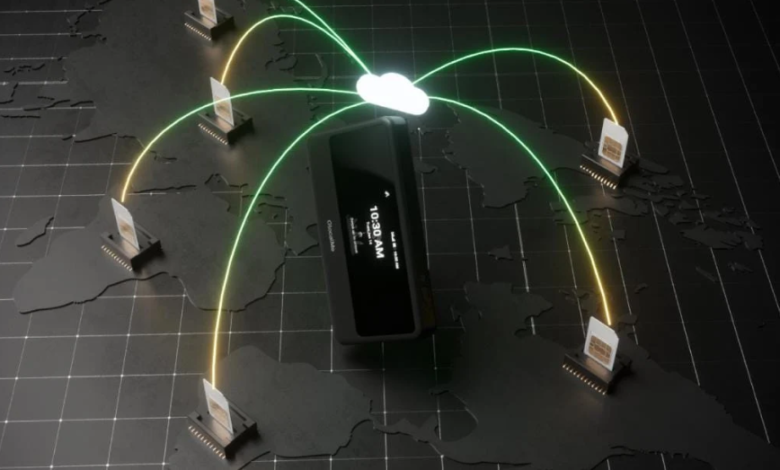
Crossing a national border does not guarantee that a hotspot will immediately connect to the most suitable network. The device must support the relevant local networks, and its service arrangement must permit connectivity in the destination country. Some portable WiFi services use cloud-based SIM technology or network-selection systems to help users access supported operators without manually changing a physical SIM card at every border.
The convenience of automatic network selection depends on the service and the conditions at the destination. Available networks may differ in coverage, speed, and congestion, while local restrictions or data-plan terms can affect usage. Travelers should verify the device’s supported countries, plan validity, and network-selection capabilities rather than assuming that one purchase automatically provides unlimited service everywhere.
It is also sensible to keep essential travel information available offline. Hotel addresses, railway tickets, emergency contacts, and route details can be saved on a phone before the journey. This does not replace internet access, but it reduces the consequences of a temporary coverage gap and allows travelers to continue essential activities while waiting for a connection to return.
Final Thoughts
Portable connectivity is most useful when it is selected around the real demands of a journey. Understanding how do portable hotspots work makes it easier to distinguish between the local WiFi connection and the cellular service that brings internet access to the device. That knowledge helps travelers compare coverage, battery life, data requirements, and multi-device support before choosing their equipment.
For people crossing borders, pocket wifi europe solutions can simplify the process of sharing internet access between phones, laptops, and tablets, provided the selected service supports their destinations and data needs. The best preparation combines a suitable hotspot with realistic coverage expectations, sensible battery planning, and offline access to essential information. With these details considered in advance, connectivity becomes one less thing to manage while exploring unfamiliar places.
FAQs
How does a portable hotspot connect to the internet?
A portable hotspot usually connects through a supported 4G LTE or 5G mobile network and then shares that connection through WiFi. Other compatible devices connect to the hotspot using its network name and password.
Can a portable WiFi device work in several European countries?
Yes, some devices and plans support multiple European destinations. Coverage depends on the specific service, supported networks, country availability, and applicable data terms, so travelers should verify their itinerary before purchasing a plan.
Is a portable hotspot better than using a smartphone?
It depends on the situation. Smartphone tethering can work well for occasional use, while a dedicated hotspot may be more convenient for multiple devices or extended connectivity sessions. Both depend on available cellular coverage and data access.
Will a portable hotspot work on trains and in rural areas?
It can work where a compatible mobile network is available, but performance varies. Tunnels, remote regions, mountainous terrain, and some train routes may have weak or intermittent coverage.
What should travelers check before buying pocket WiFi for Europe?
They should check destination coverage, data allowances, supported network technology, connected-device capacity, battery life, charging options, and any service restrictions. Comparing these details with the planned itinerary helps identify a suitable option.