Finviz: Why Investors Use This Popular Stock Screener
From stock screening and market heatmaps to financial charts and company research, here is what this investing platform offers in 2026.

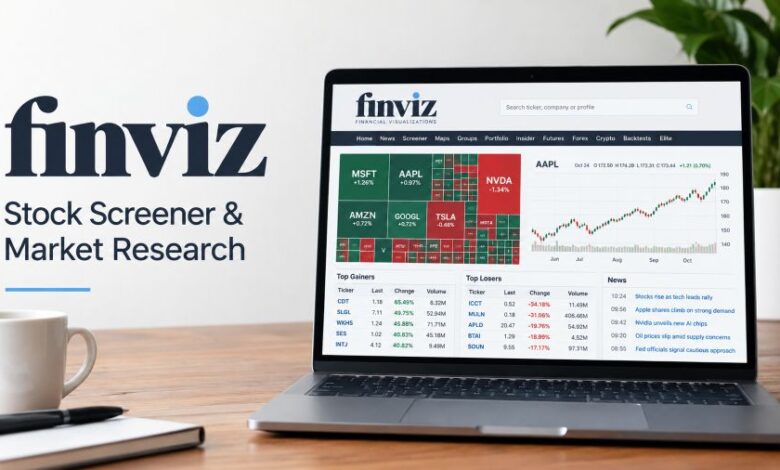
Finding good stocks takes time. There are thousands to check. Some companies are growing fast. Others have weak financial results. And market prices keep changing.
That makes research a tough job.
Finviz helps make that work easier. It brings market information into one place. Users can search stocks, compare companies, check price charts, and follow market movements.
But how useful is it really? Can beginners use it? And is the paid version worth the money?
Here is a closer look.
What Is Finviz?
Finviz is an online stock screening and financial research platform. Its name is short for Financial Visualizations.
The website mainly focuses on US-listed stocks. It gives investors tools to check company performance, financial figures, technical signals, and market activity.
Think about a simple situation.
You want to find technology companies with growing sales. Checking every company manually takes hours. With a stock screener, you can set filters and get a shorter list.
That is where this platform helps.
It also shows stock market heatmaps. These coloured maps give a quick picture of market performance.
The official website is finviz.com.
Quick Facts
| Detail | Information |
|---|---|
| Name | Finviz |
| Full meaning | Financial Visualizations |
| Website | finviz.com |
| Industry | Financial technology |
| Main service | Stock screening and market research |
| Founded | 2007 |
| Main stock markets | NASDAQ, NYSE, AMEX |
| Other market information | ETFs, futures, forex, cryptocurrencies |
| Free access | Available |
| Paid service | Finviz Elite |
| Monthly Elite price | $39.50 |
| Annual Elite price | $299.50 |
| Platform type | Web-based |
| Main users | Traders, investors, financial researchers |
Pricing and features were checked against official information available in October 2026.
How Does the Platform Work?
The process is quite simple.
Users visit the website and choose a research tool. They can then search for individual stocks or filter companies based on financial conditions.
For example, someone might want companies with a market capitalisation above $1 billion and positive earnings growth.
The screener checks the selected criteria. It then displays matching stocks.
Users can sort the results and inspect individual companies.
But there is an important point.
A matching stock is not automatically a good investment. The results only show which companies meet the chosen conditions.
Research still matters.
Main Features and Research Tools
Stock screening
The Stock Screener is one of the website’s best-known tools.
It helps users find companies based on three filter categories.
Descriptive filters cover basic company information. These include the stock exchange, industry, country, sector, and market capitalisation.
Fundamental filters focus on financial performance. Users can check earnings, revenue growth, profitability, debt, valuation ratios, and dividend information.
Technical filters examine stock-price behaviour. These include trading volume, moving averages, RSI, price changes, and volatility.
Investors can combine several filters.
Say someone wants profitable companies with strong recent price performance. They can choose the relevant financial and technical conditions.
The results become easier to review.
Market heatmaps
Stock tables can feel confusing.
Heatmaps give another way to look.
The platform displays coloured blocks representing stocks or other market assets. Green commonly represents price gains, while red represents losses.
Block size can reflect market capitalisation.
This helps users see which companies or market groups are moving.
A large red section may indicate weakness across a sector. A group of green blocks may show wider buying activity.
Still, colour alone tells little about business quality.
A rising stock can remain expensive. A falling stock may have serious financial problems.
Technical charts
Many traders study price charts daily.
The website provides charts showing stock-price history and technical information. Users can inspect price movements and look for patterns.
The paid service includes advanced interactive charts, technical studies, and drawing tools.
These features can help traders examine price behaviour across different periods.
For example, a trader might compare a stock’s price with its 50-day moving average.
Another might check RSI levels.
Neither indicator guarantees what happens next. They simply give more information about past and current market behaviour.
Company financial information
Stock prices tell only part of the story.
A company’s financial results matter too.
The platform displays financial indicators such as earnings per share, revenue growth, profit margins, debt ratios, and valuation metrics.
Here are some common examples.
| Metric | What It Shows |
|---|---|
| Market capitalisation | Approximate market value of a company |
| P/E ratio | Share price compared with earnings |
| EPS | Earnings per share |
| Revenue growth | Change in company sales |
| ROE | Profit relative to shareholders’ equity |
| Dividend yield | Annual dividends relative to share price |
| Debt/equity | Debt compared with equity |
| Relative volume | Current trading volume compared with typical volume |
These numbers help investors compare businesses.
But no single figure explains everything.
A low P/E ratio may look attractive. Yet a company could face falling profits or heavy financial risks.
Checking several figures gives a clearer picture.
ETF research
ETFs are another important part of the platform.
An exchange-traded fund holds a collection of assets. Some funds track major stock indices. Others focus on certain industries or investment themes.
On October 23, 2026, Finviz announced separate screening tools for stocks and ETFs.
The ETF Screener includes fund-related information, such as holdings and tracked indices.
This makes it possible to look for funds holding a particular stock.
Users can also compare ETFs that follow the same index.
That helps when choosing between similar funds.
Financial news and earnings
Market news can move prices quickly.
The website collects financial headlines and connects relevant information with stock research.
Users can check news affecting companies, industries, and wider markets.
It also provides earnings-related information.
Earnings reports show how a company performed during a financial period. Investors often compare reported results against analyst expectations.
A stronger-than-expected report may attract attention.
But price reactions are not always predictable.
Sometimes a company reports good numbers, yet its share price falls because investors expected even better results.
Insider trading activity
Company executives and directors sometimes buy or sell shares in their businesses.
Certain transactions must be reported publicly.
The platform collects disclosed insider trading information and displays relevant transaction details.
Investors can review these records to understand reported ownership activity.
But context matters.
An executive selling shares does not necessarily mean the company is in trouble. There may be personal financial or planned-sale reasons.
Watchlists and portfolios
Investors often follow several companies.
Watchlists make that easier.
Users can keep track of securities they want to research without repeatedly searching for each one.
Portfolio tools also help organise holdings.
Elite accounts include larger portfolio capacity and more advanced tracking features.
These tools are useful for organising research, but they should not be confused with brokerage accounts that hold financial assets.
What Changed in 2026?
Several product updates arrived during 2026.
In August, Elite gained automatic candlestick-pattern detection. This helps users identify selected chart formations without marking each one manually.
September brought new market visualisation features, including the Matrix Map. The Matrix view organises stocks by industry and company size.
The company also announced improvements to earnings information and chart research.
October brought another set of changes.
The platform announced API updates, introduced embeddable market maps, and separated its stock and ETF screening products.
For website publishers, the map feature is especially interesting.
Members can create an embeddable market map, choose visual settings, and copy the supplied code into a website.
These updates are described on the company’s official product blog.
Free vs Elite: What Is the Difference?
The platform offers basic free access and a paid subscription.
The free service covers everyday market research. Elite adds features aimed at people who need more detailed information and regular market monitoring.
| Feature | Free | Elite |
|---|---|---|
| Basic stock screening | Yes | Yes |
| Market heatmaps | Yes | Yes, with advanced options |
| US stock quotes | Delayed | Real-time |
| Advanced interactive charts | Limited | Included |
| Advanced screening filters | Limited | Included |
| Custom screener views | Limited | Included |
| Financial statement history | Limited | Eight years |
| ETF research | Basic access | Expanded access |
| Advanced alerts | Limited | Included |
| Excel and CSV exports | Restricted | Included |
| API data access | Restricted | Included |
| Advertisement-free interface | No | Yes |
The difference becomes clearer with regular use.
Someone checking stocks occasionally may not need advanced features.
A trader monitoring prices throughout the day could find real-time data more useful.
How Much Does Elite Cost?
According to the official pricing information available in October 2026, two paid subscription options are offered.
The monthly plan costs $39.50.
The annual plan costs $299.50, equal to about $24.96 per month when spread across twelve months.
Both paid plans provide the same Elite features.
A free Elite trial is also advertised. A payment card is required, and the selected plan starts automatically after the trial unless the subscriber cancels beforehand.
Refunds are subject to the company’s stated policy, including a written request within the initial 30-day period.
Prices and subscription conditions can change, so readers should check the official Elite pricing page before subscribing.
How to Use the Stock Screener
Starting does not require an advanced trading background.
First, open the website.
Visit the homepage and select Stock Screener.
Next, choose your market conditions.
You might start with sector, market capitalisation, and trading volume.
Then, add financial filters.
Select figures that matter to your research, such as profitability or sales growth.
Check the matching companies.
The screener shows stocks meeting your selected conditions.
Open individual stock pages.
Read the available financial information. Check charts and company news.
Compare before making decisions.
Look beyond one indicator. Review business fundamentals and current risks.
Start with a few filters. Too many conditions can hide useful companies.
Who Can Benefit From These Tools?
Different investors look for different information.
Day traders may focus on trading volume, momentum, and short-term price movement.
Swing traders may spend more time studying chart formations and technical indicators.
Long-term investors may look closely at company profits, financial health, and business growth.
ETF investors can compare funds and inspect holdings.
Financial writers may use market visualisations and publicly available data while researching articles.
Beginners can also learn from the platform, though financial terminology may take some practice.
Main Benefits
The biggest benefit is convenience.
Users can check a large number of stocks through one screening interface. That can reduce repetitive research.
The heatmaps are useful too. They show market movement in a visual format.
Financial figures are available alongside stock charts, making basic company comparisons easier.
Free access is another benefit.
People can try several research tools without immediately buying a subscription.
For users who regularly monitor markets, the Elite service adds more detailed features.
Limitations Worth Knowing
No research platform is perfect.
The first limitation is market coverage. Its main stock database concentrates on US exchanges, including NASDAQ, NYSE, and AMEX.
That means users seeking complete coverage of overseas stock exchanges may need another source.
Free stock quotes are delayed.
According to the official FAQ, standard US stock quotes are delayed by approximately one minute. Elite provides real-time US stock quotes.
Futures data carries a separate delay.
Another limitation concerns historical screening. The company states that it does not provide historical screener snapshots, although charts include historical data.
There is also a learning curve.
New users may find terms such as PEG, RSI, ATR, or relative volume confusing at first.
And charts have limits.
Price patterns cannot guarantee future returns. Strong financial ratios cannot remove business risks either.
Is It Safe and Legitimate?
Finviz is an established financial research website with a history dating back to 2007.
It publishes market information and maintains official subscription, help, and support pages.
That provides a useful starting point when checking whether the service is genuine.
But there is a difference between a legitimate research service and a guaranteed investment result.
The website’s data should still be checked against company filings, exchange announcements, and other relevant sources before making serious financial decisions.
Users should also understand subscription renewal conditions before entering payment details.
Is the Paid Version Worth It?
That depends on how often you use it.
For casual research, the free version may be enough.
You can examine stock information, try screening filters, and review broad market movements.
Elite becomes more relevant when real-time quotes, advanced charting, custom screens, alerts, or data exports are regular requirements.
A professional analyst may value the saved research time.
A beginner who checks markets once a week might prefer to start free.
Paying for better data does not guarantee better investment results.
Your research process still matters.
Final Thought
Finviz gives investors a practical way to study financial markets.
The stock screener helps narrow choices. Heatmaps make market movements easier to read. Financial information helps users compare companies.
Its free version covers many basic needs.
The Elite subscription adds deeper research features for frequent users.
Still, the platform should support investment research, not replace personal judgment.
A good screen is a starting point. A careful decision takes more work.
Frequently Asked Questions
1. What is this platform mainly used for?
It is mainly used for stock screening, market analysis, financial research, and chart-based research.
2. Can beginners use it for free?
Yes. Beginners can access basic screening and financial research features without an Elite subscription.
3. Does it offer real-time stock prices?
Elite provides real-time US stock quotes. Free US stock quotes are delayed by approximately one minute.
4. Can users buy shares through the website?
It is primarily a research platform rather than a conventional stock brokerage. Users generally place trades through separate brokerage services.
5. Does it cover international stock markets?
Its main stock coverage focuses on US-listed securities. Foreign companies listed on supported US exchanges may also appear.
6. Can it predict future stock prices?
No. Financial indicators and historical charts cannot guarantee future market movements.
7. What is the difference between free access and Elite?
The free version provides basic research tools. Elite adds real-time quotes, advanced charts, more screening features, alerts, and data exports.
8. Is it useful for long-term investing?
Yes. Its financial ratios, company information, and ETF research features can support long-term investment analysis.