Schoology Alfa: What Students Should Know About This Learning Platform
Learn how the Alfa Fundación learning portal works, what Schoology offers, and how students can safely access their school accounts in 2026.

Introduction
Schoology Alfa is linked to Alfa Fundación, an educational organization in Monterrey, Mexico. The portal uses Schoology Learning, a learning management system owned by PowerSchool.
The basic idea is simple. Schools need a place for learning materials. Students need access to their coursework. Teachers need ways to manage lessons.
Schoology provides those tools.
But here’s something worth understanding. Schoology Alfa isn’t a separate software product. It refers to an institution-specific Schoology environment associated with Alfa Fundación.
That distinction matters, especially for students searching for the correct login page.
Quick Facts
| Detail | Information |
|---|---|
| Name | Schoology Alfa |
| Platform | Schoology Learning |
| Software provider | PowerSchool |
| Associated organization | Alfa Fundación |
| Organization location | Monterrey, Nuevo León, Mexico |
| Software type | Learning Management System (LMS) |
| Main users | Authorized educational users |
| Common platform functions | Courses, assignments, assessments and grades |
| Access | Institution-managed login |
| Authentication | Microsoft sign-in redirect observed |
| Mobile support | Official Schoology mobile apps |
| Separate Alfa application | Not verified |
| Public Alfa-specific subscription price | Not confirmed |
Understanding the Learning System
Think about a normal classroom.
Students attend lessons and receive homework. Teachers check their work. Grades are recorded.
Schoology brings many of these activities into an online system.
Students can find course materials. Teachers can publish assignments. Schools can also control which information users see.
Basically, it works like a digital classroom.
The platform itself serves different educational institutions. Each organization can manage its own accounts and settings.
That explains the Alfa connection.
Schoology Alfa is associated with Alfa Fundación’s educational environment. It uses an established learning platform rather than a separately developed system.
Still, access is not automatic.
A person must have the correct permissions to enter the institution’s learning environment.
The Educational Organization Behind It
Alfa Fundación operates in Monterrey, Mexico.
Its educational work supports talented students from families with limited financial resources. The organization aims to help young people continue their studies and reach university.
Its programs cover different educational stages.
One part supports secondary-school students through extracurricular academic centers. Another provides a three-year preparatory education.
The foundation also offers university-related support.
Its educational history goes back several years. The first extracurricular center opened in 2013. The preparatory school started in 2015.
PowerSchool has a different role.
It owns the underlying Schoology Learning software. PowerSchool completed its acquisition of Schoology in November 2019.
So the responsibilities are different. Alfa Fundación runs its educational programs, while PowerSchool supplies the learning management technology.
Main Features Available Through Schoology
Schoology has several established learning tools.
But there’s one important point.
A feature offered by PowerSchool is not automatically available in every Alfa Fundación account. Schools control access through their own settings.
Here is what the underlying platform supports.
Course Materials and Learning Resources
Teachers can organize course content online.
Students may find reading materials, lesson files, instructions and other resources within their assigned courses.
This can make studying easier.
Instead of searching through different files, students can check the material shared by their teachers.
Online Assignment Management
Assignments are a standard Schoology feature.
Teachers can create coursework with instructions and deadlines. Students can then review assigned tasks and submit supported files.
Teachers may also review submissions.
This helps keep academic work organized.
Still, each course has its own rules. A teacher may set deadlines or limit submission options.
Grades and Teacher Feedback
Schoology supports grading tools.
Teachers can record scores and leave feedback on student work. Students can review published grades where the school permits access.
But grades may not appear immediately.
Some scores remain unpublished until the teacher releases them. Schools may also maintain an official grade record in another system.
Assessments and Class Activities
The platform supports online assessments.
Teachers can prepare different types of academic questions and learning activities.
Students may complete these tasks through their courses.
Available assessment options depend on the school’s settings and the particular assignment.
Course Updates and Communication
Communication is part of learning.
Schoology lets teachers share course announcements and updates. It also supports messaging and discussions where enabled.
Students can use these functions to follow academic information.
The actual communication tools visible in Schoology Alfa depend on the institution’s permissions.
How to Access Your School Account
Looking for the login?
Start with the correct institution.
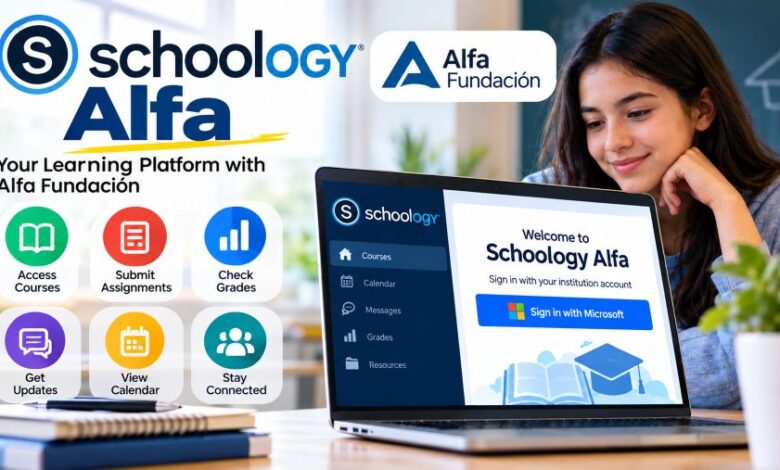
The Alfa Fundación Schoology portal is hosted at alfafundacion.schoology.com.
During verification in October 2026, this address redirected to Microsoft’s authentication service through Schoology.
That indicates Microsoft-based sign-in at the public entry point.
Here is how authorized users can approach login:
- Open the Alfa Fundación Schoology address.
- Follow the displayed sign-in instructions.
- Use the account provided or approved by the institution.
- Complete any required account verification.
- Open the available courses after signing in.
The exact screen may change.
Students should follow instructions supplied by their school or administrator rather than assuming that any Microsoft account will work.
Also, avoid unofficial login pages.
A website discussing Schoology Alfa is not necessarily part of the actual school system.
Why Does the Login Redirect to Microsoft?
Some educational organizations use external identity services.
This method is commonly called single sign-on, or SSO.
Instead of entering credentials into a separate Schoology form, users authenticate through an approved account system.
The Alfa portal’s observed redirect points toward Microsoft’s authentication service.
This does not mean every Microsoft user can sign in.
Account eligibility is still controlled by the institution.
If access fails, the school’s authorized support team is the appropriate place to check account permissions.
How Students Can Use the Platform
Students usually want quick answers.
Where is the assignment? Has the teacher shared a new lesson? Is the grade available?
Schoology provides tools for these tasks.
After gaining authorized access, a student may be able to:
- Review enrolled courses.
- Read available learning materials.
- Check assigned coursework.
- Submit supported assignments.
- View published grades.
- Follow course announcements.
- Check calendar information.
Some functions may be restricted.
For example, a course might not display grades until the teacher publishes them.
Students should check their course instructions before assuming a feature is missing or broken.
What Teachers Can Do
Teachers have a different experience.
Their accounts support course management and academic work.
They can create assignments, organize materials and review submissions using Schoology’s available tools.
The system also supports grading.
Teachers may provide comments on submitted documents. Certain Schoology tools allow feedback directly within the document viewer.
This can help students understand corrections.
Still, these are platform-level features. Their availability within Alfa Fundación depends on the school’s setup.
Can Parents Monitor Student Progress?
Schoology supports parent accounts.
These accounts can provide access to a child’s academic information when the institution permits it.
Depending on configuration, parents may be able to review grades and course activity.
Schoology also documents parent access through its mobile application.
But there is a limitation.
Public information does not establish which parent-account features Alfa Fundación currently enables.
Parents should ask the institution whether access is available and how accounts are issued.
Using the Platform on a Mobile Phone
Learning doesn’t always happen at a desk.
Schoology offers mobile applications for Android and iOS.
The official applications support educational activities such as reviewing courses and checking grades. Other functions include assignments, notifications and course calendars.
Some tasks work differently on mobile.
A particular file type or assessment may require a supported browser or another application.
There is also no verified separate official mobile application specifically named Schoology Alfa.
For now, users should rely on the regular Schoology application and their institution’s sign-in instructions.
Common Login Problems and Possible Fixes
Technical issues happen.
Sometimes the password is wrong. Sometimes the selected account isn’t authorized.
Here are several common situations.
| Problem | What to check |
|---|---|
| Incorrect password | Use the approved account recovery method |
| Wrong Microsoft account | Select the institution-approved account |
| Missing courses | Ask the teacher to check enrollment |
| Account access denied | Contact institutional support |
| Page not loading | Try refreshing or updating the browser |
| Assignment submission issue | Check instructions, deadline and permissions |
| Grades not showing | Confirm whether the teacher has published them |
Do not share your password.
Avoid websites asking for payment to unlock access. Only the institution can confirm its account policies.
Benefits of Using a Learning Management System
A structured learning platform can make coursework easier to follow.
Students can check the material assigned to them. Teachers can manage submitted work without relying entirely on paper documents.
The calendar tools may also help users track deadlines.
Another benefit is feedback.
Students can return to published comments and review their work.
But a learning system still needs regular use.
If students ignore course announcements, they may miss updates. If teachers don’t publish material, there may be nothing new to review.
The software supports classroom activity. It does not replace the academic work behind it.
What Are the Main Limitations?
No learning platform works perfectly for everyone.
Schoology requires a suitable device and internet connection for most online activities.
Account permissions can limit access.
Some functions may also behave differently between the mobile application and the web version.
The Alfa environment has another limitation for public researchers.
Its internal course setup is not openly documented. This means outsiders cannot confirm every available feature, user role or account requirement.
That is why students should treat Schoology’s general documentation as platform information, not as a promise about their particular Alfa account.
Is the Portal Legitimate and Safe to Use?
Schoology Learning is an established educational software product operated by PowerSchool.
The Alfa Fundación Schoology address uses the Schoology domain and has been observed directing visitors to Microsoft authentication.
These are useful signs when checking the portal.
But a legitimate platform doesn’t guarantee that every related search result is trustworthy.
Students should access the institution-approved address and avoid unfamiliar websites requesting login information.
They should also check the browser address before entering credentials.
Account security matters.
Is Access Free?
This question needs a careful answer.
Alfa Fundación’s published educational materials describe its preparatory school as tuition-free.
But that fact does not establish public access or pricing for its Schoology portal.
No separate, publicly confirmed Schoology Alfa subscription price was found.
Schoology itself is offered to educational organizations through PowerSchool.
Users should contact Alfa Fundación about eligibility and account access rather than assuming anyone can register independently.
What Makes This Environment Different?
The main difference is institutional access.
Schoology Learning is the underlying software. Alfa Fundación’s portal is an organization-specific entry point into that software.
The institution controls account eligibility and course access.
This also explains why a general Schoology account may not open Alfa Fundación’s private courses.
The learning tools come from Schoology. The account requirements come from the institution.
Understanding that difference can prevent login confusion.
Final Thought
Schoology Alfa connects an established learning system with Alfa Fundación’s educational environment.
The important facts are clear.
PowerSchool provides the Schoology platform. Alfa Fundación is the associated educational organization. The public portal has also been observed using Microsoft authentication.
Students should use their approved school accounts.
And if something doesn’t work, ask the institution before trying third-party login services.
A correct login matters more than a complicated workaround.
Frequently Asked Questions
1. What is Schoology Alfa?
Schoology Alfa refers to the Schoology Learning environment associated with Alfa Fundación in Monterrey, Mexico. It is not a separately verified software product.
2. Who owns the underlying platform?
PowerSchool owns Schoology. The company completed its acquisition of Schoology in November 2019.
3. How can students log in?
Authorized users can start at the Alfa Fundación Schoology portal and follow the institution’s sign-in process.
4. Why does the portal open Microsoft login?
The public portal has been observed redirecting to Microsoft’s authentication service. This indicates an external account sign-in process.
5. Can students check their grades?
Schoology supports grade viewing. Actual visibility depends on course settings and whether teachers have published the scores.
6. Is there an Android application?
Yes. Schoology provides an official Android application. However, a separate Alfa-specific mobile app has not been verified.
7. Can parents create accounts?
Schoology supports parent accounts. Alfa Fundación’s public account registration rules and parent permissions have not been confirmed.
8. Is it available to everyone?
Public access has not been established. Users should follow the institution’s requirements for authorized accounts.
9. Can teachers upload assignments?
Yes. Schoology includes assignment creation and submission features. Access within the Alfa environment depends on the school and course settings.
10. Is Schoology Alfa still relevant in 2026?
Yes. The associated Schoology portal remains identifiable, and PowerSchool continues maintaining and developing its Schoology Learning product.