Rox.com Products Catalog Explained: What Rox Actually Offers
A clear look at Rox products, AI sales agents, pricing, sales tools, integrations, security, and what users actually get from the platform.

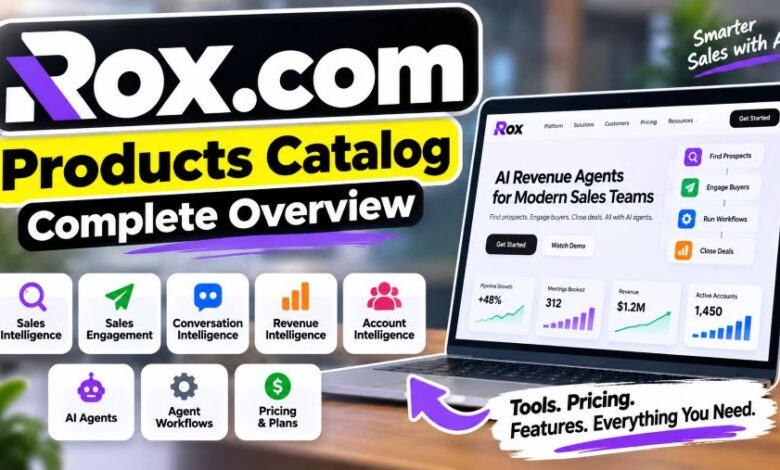
Searching for the Rox.com products catalog can get confusing fast.
Here is the main point. Rox.com is not a normal online shop with physical products, SKUs, clothing, electronics, or household goods. The official website belongs to Rox Data Corp, a company that sells AI software for sales and revenue teams.
Its products work around sales research, prospecting, account data, outreach, meetings, pipeline checks, and automated workflows. Basically, Rox wants its AI agents to handle work that sales representatives often do across several separate apps.
Quick Facts About Rox.com
| Fact | Details |
|---|---|
| Website | Rox.com |
| Company | Rox Data Corp |
| Product type | AI revenue and sales software |
| Main users | Sales teams, RevOps teams, account teams, and companies |
| Main product model | AI revenue agents |
| Main platform areas | Sales Intelligence, Sales Engagement, Conversation Intelligence, Revenue Intelligence, Account Intelligence |
| Agent Workflows | Yes |
| Outbound prospecting | Yes |
| CRM write-back | Available |
| Individual plan | $100 per month |
| Individual actions | 10,000 per month |
| Teams plan | $255 per month |
| Team actions | 15,000 per month |
| Enterprise plan | Custom pricing |
| SOC 2 Type I | Listed |
| SOC 2 Type II | Listed |
| GDPR | Listed as compliant |
| ISO 27001 | Rox currently marks it as coming soon |
| Company address | 251 Rhode Island St, Suite 205, San Francisco, CA 94103 |
The pricing and security details above come from Rox’s current official pages.
What Is the Rox.com Products Catalog?
The Rox.com products catalog is really a software product lineup.
No shopping cart full of physical goods.
Instead, Rox groups its platform around AI agents and sales intelligence tools. The current website lists five main intelligence and engagement areas along with Agent Workflows and its Outbound Agent.
The main areas are:
| Rox product area | Main job |
|---|---|
| Agent Workflows | Runs sales and revenue tasks using AI agents |
| Sales Intelligence | Finds prospects, enriches records, and checks buying signals |
| Sales Engagement | Handles outbound, inbound, calls, and multi-channel sequences |
| Conversation Intelligence | Works with meeting context, commitments, and follow-ups |
| Revenue Intelligence | Checks pipeline health, deal risks, and CRM activity |
| Account Intelligence | Keeps account details, contacts, activity, and buying signals together |
| Outbound Agent | Finds and contacts matching prospects |
So, think software catalog. Not retail catalog.
Rox Agent Workflows
Agent Workflows are a major part of the current Rox platform.
Users can set up processes that run tasks through Rox agents. Some work can start from a trigger and continue through several actions without a salesperson manually repeating each part.
Rox has also built a Workflow Builder. A user can describe the workflow they want, then the system can build the workflow structure. Rox says these workflows can contain variables, conditions, loops, actions, and other logic.
A sales team could, for example, set up a workflow that checks an account, pulls fresh information, creates a report, and shares it with the right person.
That saves repetitive clicks.
Still, human checks matter. Rox states that automated features work inside user-set parameters and require setup and ongoing oversight.
Rox Sales Intelligence
Sales Intelligence deals with finding and checking sales targets.
Rox currently lists four main functions here: prospecting, native enrichment, buying signals, and ICP fit scoring.
Prospecting
Rox can find companies or people that match a company’s ideal customer profile.
A rep can ask the system to find prospects similar to existing strong customers. That cuts down manual list building.
Native Enrichment
Contact records can be filled with newer information.
This can include verified email addresses, job titles, and company details. The point is simple: give sales agents cleaner information before they reach out.
Buying Signals
Rox can watch company activity.
The official Sales Intelligence page gives examples such as funding, company growth, hiring surges, and site activity. These signals may tell a salesperson that an account deserves attention.
ICP Fit Scoring
Rox can score accounts and contacts against an ideal customer profile.
Basically, it helps answer one question.
Is this lead worth chasing?
That can be useful when a team has a huge prospect list but limited time.
Rox Sales Engagement
Sales Engagement handles contact with prospects.
This part of the Rox.com products catalog includes the Outbound Agent, Inbound Agent, Dialer, and Multi-Channel Sequences.
Outbound Agent
The Outbound Agent finds new prospects that match a chosen ideal customer profile and can reach out to them.
A user first tells Rox who they want.
Rox then finds prospects, verifies them, prepares sequences, and can carry out outreach based on the configured setup.
Inbound Agent
Inbound leads can disappear quickly when nobody replies.
Rox says its Inbound Agent can qualify and respond to incoming leads so those contacts do not sit untouched.
Dialer
The Dialer works through a calling queue.
It can connect a sales representative once a live prospect answers and can generate call scripts for the conversation.
Multi-Channel Sequences
Rox can coordinate outreach across email, calls, and LinkedIn.
That gives the sales team one sequence rather than disconnected activity across separate channels.
Rox Conversation Intelligence
Meetings create a lot of useful information.
They also create messy notes.
Rox Conversation Intelligence tries to capture that context and keep it tied to the account.
The current product includes pre-meeting briefs, commitment tracking, drafted follow-ups, and context that can carry through account handoffs.
Pre-Meeting Briefs
Before a call, Rox can surface earlier conversations, unanswered questions, and objections already raised.
Pretty handy.
A rep does not need to search through old notes minutes before a meeting.
Commitment Tracking
The software can extract action items and attach owners.
That makes promises easier to track after a conversation.
Drafted Follow-Ups
Rox can prepare a recap and suggested next step after a meeting.
The salesperson can then check the draft before sending anything.
Context Through Handoffs
Accounts often move between teams.
A deal may go from an account executive to a customer success manager. Rox says the conversation history can move with that handoff, keeping previous context available.
Rox Revenue Intelligence
Revenue Intelligence looks at active deals and pipeline data.
Its current functions include deal-risk detection, evidence behind risk flags, automatic CRM write-back, and prepared pipeline reviews.
Deal Risk Detection
Rox can flag problems such as stalled engagement, quiet sponsors, or closing dates that do not fit the remaining approval process.
That gives managers something concrete to check.
Evidence Behind Flags
This part matters.
Rox says users can open a risk flag and inspect the emails, meetings, and records behind it.
The user is not simply shown a warning with no context.
Automatic CRM Write-Back
Activities, contacts, and deal movement can be written back to the CRM automatically.
That may reduce manual CRM entry.
Pipeline Reviews
The system can prepare risk information before a pipeline review.
Managers can then start with flagged deals instead of collecting every update from scratch.
Rox Account Intelligence
Account Intelligence builds a current view of an account.
Rox says this can bring together deals, contacts, activity, product usage, documents, and outside news.
Buying committee mapping is part of the product too.
Users can see contacts connected with an account and track role changes or relationship status.
For large B2B accounts, that can clear up a common problem: the useful information exists, but it sits across too many places.
Rox brings those pieces into one account view.
Older Rox Product Names You May See
Older articles about Rox may mention a different product lineup.
That is not necessarily wrong. The platform has changed.
When Rox announced general availability in September 2025, it listed products and features such as Command, Custom Apps, Agent-to-Agent, Monitor, Research, Plays, Outreach, Meet, Opportunities, and Autofill.
Here is how those older names were described at that time:
| Older Rox name | Purpose |
|---|---|
| Command | AI action interface |
| Custom Apps | Company-specific AI workflows |
| Agent-to-Agent | Work between specialized agents |
| Monitor | Account alerts and signals |
| Research | Ongoing account research |
| Plays | AI-triggered sales motions |
| Outreach | Personalized sales campaigns |
| Meet | Meeting transcription |
| Opportunities | Pipeline updates and enrichment |
| Autofill | RFP and security questionnaire assistance |
The current website now puts more emphasis on broader platform areas such as Sales Intelligence, Sales Engagement, Conversation Intelligence, Revenue Intelligence, and Account Intelligence.
So older reviews may look different.
Check the date first.
Rox.com Pricing
Pricing is one area where fresh checking really matters.
Older Rox pages and search results can show previous pricing. The live pricing page currently shows three main choices.
| Plan | Current public price | Monthly actions | Main use |
|---|---|---|---|
| Individual | $100/month | 10,000 | Individual sales professionals |
| Teams | $255/month | 15,000 | Multi-user sales teams |
| Enterprise | Contact sales | Custom | Larger companies |
Individual Plan
The Individual plan currently costs $100 per month.
It includes 10,000 actions each month.
Rox lists account research and management, account/contact enrichment, and multi-channel outbound among the features available with this plan.
Teams Plan
The Teams plan currently costs $255 per month.
It includes 15,000 monthly actions.
The plan adds multi-user workspaces with unlimited seats, CRM sync and write-back, plus team and user management controls.
Enterprise Plan
Enterprise pricing is not publicly fixed.
Customers need to contact Rox.
The current Enterprise plan adds data warehouse sync, SAML, SCIM, SSO support, and a dedicated deployment and support team.
Prices can change.
Check Rox’s live pricing page before buying.
What Are Rox Agent Actions?
Rox measures paid usage through Agent Actions.
An Agent Action represents work performed by a Rox AI agent.
Examples on the official pricing page include prospect research, meeting briefs, and customer insights. Different jobs can consume different action amounts because some tasks require heavier data processing or different AI resources.
Users can also check an agent activity log to see action usage.
Unused actions do not currently roll into the next billing cycle, according to the pricing FAQ.
Rox Integrations
Rox works with other business software.
The company’s current security information names integrations including Salesforce, HubSpot, Gmail, Microsoft Outlook, and Slack. Rox notes that third-party service availability can change based on the provider.
This setup makes sense for the product.
Sales information usually lives across a CRM, inbox, calendar, meetings, and internal systems. Rox needs access to permitted sources if its agents are going to work with that context.
Users should still check exact connector support before buying.
Business software changes often.
Rox Security and Data Handling
Rox publicly lists SOC 2 Type I, SOC 2 Type II, and GDPR compliance on its security page.
ISO 27001 is currently shown as coming soon.
Rox also states that customer data processed through its platform is encrypted in transit and at rest using AES-256 encryption.
The company says customer data is not used to train generalized machine-learning models.
There is another useful warning on the same page.
Rox says AI-generated material, including prospect suggestions, message drafts, meeting summaries, and pipeline scores, should be reviewed by authorized people before action is taken.
That is a sensible rule.
AI can still get things wrong.
Who Runs Rox?
Rox’s current company page names Ishan Mukherjee as co-founder and CEO.
Shriram Sridharan is listed as co-founder and CTO, while Diogo Ribeiro is co-founder and CGO. Christopher Ré is listed as co-founder for research.
The official website currently gives its address as:
251 Rhode Island St, Suite 205, San Francisco, CA 94103.
Who Is Rox Made For?
Rox makes the most sense for teams that handle B2B sales and have a lot of customer information spread across sales systems.
That may include sales representatives, account executives, sales development teams, RevOps teams, sales managers, and account teams.
A solo user can now buy the Individual plan too.
So Rox is no longer presented only as software for very large teams. Its current website explicitly says Rox is available for teams of all sizes.
Still, the value will depend on the work being done.
A person who needs basic contact storage may not need every Rox feature. A team dealing with research, prospecting, active opportunities, meetings, CRM updates, and account signals has far more areas where these agents could be used.
Is Rox.com a Shopping Website?
No.
This is probably the biggest misunderstanding behind searches for the Rox.com products catalog.
Rox.com presents itself as a revenue-agent software company. Its official site is built around AI sales products, customer stories, pricing, research, security, and software access.
You will not find a standard physical-product catalog there.
So if another page describes Rox.com as a general online store selling random consumer products, check that claim carefully against the official website.
The official site tells a very different story.
Can Rox Replace a CRM?
Sometimes Rox may take over work usually handled inside a CRM, but it should not automatically be described as a complete CRM replacement for every company.
The current product supports CRM sync and write-back. It also works with services such as Salesforce and HubSpot.
Rox did report one 2025 customer case where Puma Energy replaced Salesforce, but that is a specific vendor-reported customer result. It does not mean every Rox customer should remove its CRM.
For many teams, Rox can sit alongside existing sales systems.
Is Rox Fully Autonomous?
Rox uses words such as automated and autonomous for parts of its platform.
There is a limit.
The company explicitly says these features operate inside user-defined parameters and need initial setup plus continuing oversight.
So users should not read “autonomous” as “switch it on and never check anything again.”
People stay involved.
Especially before messages, recommendations, deal scores, or other AI outputs affect real customers.
What Makes the Rox Product Line Different?
The big idea is consolidation.
Rox puts prospect research, enrichment, outreach, meeting context, account information, pipeline checks, and agent workflows under one platform.
That means a team may be able to reduce some jumping between separate sales tools.
The actual savings will vary.
Rox itself says customer performance numbers depend on data quality, CRM setup, outreach volume, market conditions, and target audience. It does not guarantee a specific revenue result.
That detail matters.
Vendor case studies can show what happened for one customer. They cannot promise the same result for everyone.
Final Thought
The Rox.com products catalog is easier to understand once one thing is clear: Rox.com sells AI sales software, not physical consumer products.
Its current platform covers prospecting, contact enrichment, outreach, meetings, account information, pipeline checks, CRM updates, and automated agent workflows.
The catalog keeps changing too.
Older Rox pages may mention Command, Meet, Monitor, Plays, or Autofill. The current site groups much of the product around Agent Workflows, Sales Intelligence, Sales Engagement, Conversation Intelligence, Revenue Intelligence, Account Intelligence, and the Outbound Agent.
Pricing has changed as well.
As of September 23, 2026, the official pricing page shows an Individual plan at $100 per month, Teams at $255 per month, and custom Enterprise pricing.
For anyone researching Rox, use the live website first.
That keeps the facts straight.
Frequently Asked Questions
What is the Rox.com products catalog?
The Rox.com products catalog is a collection of AI sales and revenue software rather than physical products. Rox currently offers tools for prospecting, engagement, conversations, pipeline intelligence, account intelligence, and agent workflows.
Is Rox.com an online shopping store?
No. The official Rox.com website belongs to Rox Data Corp and focuses on AI revenue agents and sales software.
How much does Rox cost?
The current official pricing page lists Individual at $100 per month with 10,000 actions and Teams at $255 per month with 15,000 actions. Enterprise pricing requires contacting Rox.
Does Rox offer a free option?
The current pricing page includes “Start for free” calls to action for its paid plans, allowing users to start before upgrading. Exact free usage terms should be checked on the live Rox pricing page because plan details can change.
What does Rox Sales Intelligence do?
It can find prospects, enrich contact and company records, watch buying signals, and score accounts against an ideal customer profile.
Can Rox send sales outreach?
Yes. Rox Sales Engagement includes outbound and inbound agents, a dialer, and sequences covering email, calls, and LinkedIn.
Does Rox connect with Salesforce?
Rox lists Salesforce among its third-party integrations. HubSpot, Gmail, Microsoft Outlook, and Slack are also named on its current website.
Is Rox secure?
Rox currently lists SOC 2 Type I, SOC 2 Type II, and GDPR compliance. It says customer data is encrypted in transit and at rest and is not used to train generalized machine-learning models. ISO 27001 is currently marked as coming soon.